
The withdrawal button the EU now expects, built for PrestaShop.
Directive (EU) 2023/2673 introduces a permanent, easy-to-find withdrawal function for distance contracts. EU Withdrawal drops a visible “Withdraw from contract” button into your store and handles the whole request — no customer login, email-verified, confirmed on a durable medium.
One-time licence · one shop domain · installs in minutes
- 2023/2673
- Directive implemented
- 14 days
- Statutory withdrawal window
- 0
- Customer logins required
- 1 click
- From storefront to request
A button is no longer a nicety. It’s the expected way to withdraw.
The EU has been steadily moving the right of withdrawal from buried legal text toward a function the customer can actually use. Directive (EU) 2023/2673 makes that explicit: a withdrawal function that is permanently available, easy to find, and legibly labelled — in practice, a button that says something like “withdraw from contract here.”
Alongside it, the Consumer Rights Directive (2011/83/EU) still grants a 14-day right of withdrawal on most distance contracts, with a full refund — including standard delivery — when it is exercised in time.
- 01
Permanently available
The withdrawal function has to be there when the customer looks for it — not hidden three clicks deep in an account area.
- 02
Plainly labelled
Legible, unambiguous wording. EU Withdrawal ships the standard “Withdraw from contract” label and is fully translatable.
- 03
Confirmed on a durable medium
Every request produces a reference number and an email confirmation the customer can keep for their records.
EU Withdrawal is a compliance tool, not legal advice. Whether a given rule applies to your store depends on what you sell and to whom — confirm your obligations with your own counsel.
From storefront to a logged request, without an account.
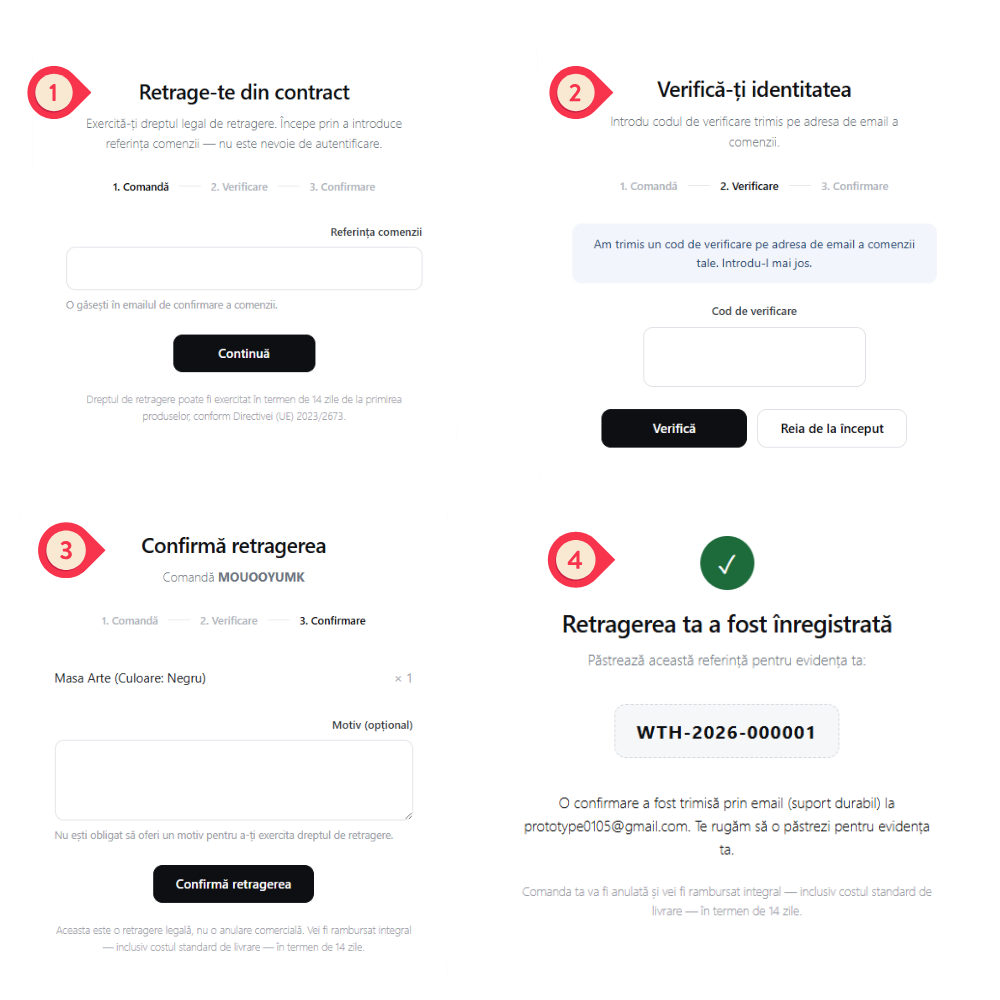
Show it as a floating button or as a static link in your footer — your choice. Either way, opening it starts a focused three-step form. Try it — this is the real flow.
- 01Order
Find the order
The customer enters the order reference from their confirmation email. No login, no password reset, no friction.
- 02Verify
Verify by email
A short code is sent to the order’s email address. This proves it’s really the customer before anything is recorded.
- 03Confirm
Confirm the withdrawal
They review the items, optionally add a reason — never required — and confirm. A legal withdrawal, not a commercial cancellation.
- 04Done
Reference + durable record
They get a reference number on screen and a confirmation email. You get the request in the back office, ready to process.
Withdraw from contract
Exercise your legal right of withdrawal. Start by entering your order reference — no account needed.
The right of withdrawal may be exercised within 14 days of receiving the goods, under Directive (EU) 2023/2673.
Everything the request needs — front, back, and on the record.
The visible button
A clean “Withdraw from contract” pill — show it floating on the page, or as a static link in your footer. Style and label are yours.
No-login request form
Three honest steps — order, email verification, confirmation. Customers never create an account to exercise a legal right.
Email verification
A one-time code to the order’s email address keeps requests genuine and tied to the real customer.
Durable-medium confirmation
Reference number on screen plus a confirmation email — the durable record the rules expect.
Back-office management
Every request lands in a dedicated “Withdrawal requests” list with reference, order, status and the customer’s stated reason.
Admin & verification emails
Customer confirmation, the verification code, and an internal notification — so nothing depends on someone watching a screen.
Fully translatable
Ships ready for your storefront languages. Button label, form copy and emails are all editable.
Lightweight & self-hosted
Runs inside your PrestaShop. No customer data leaves your shop except the licence check on your own domain.
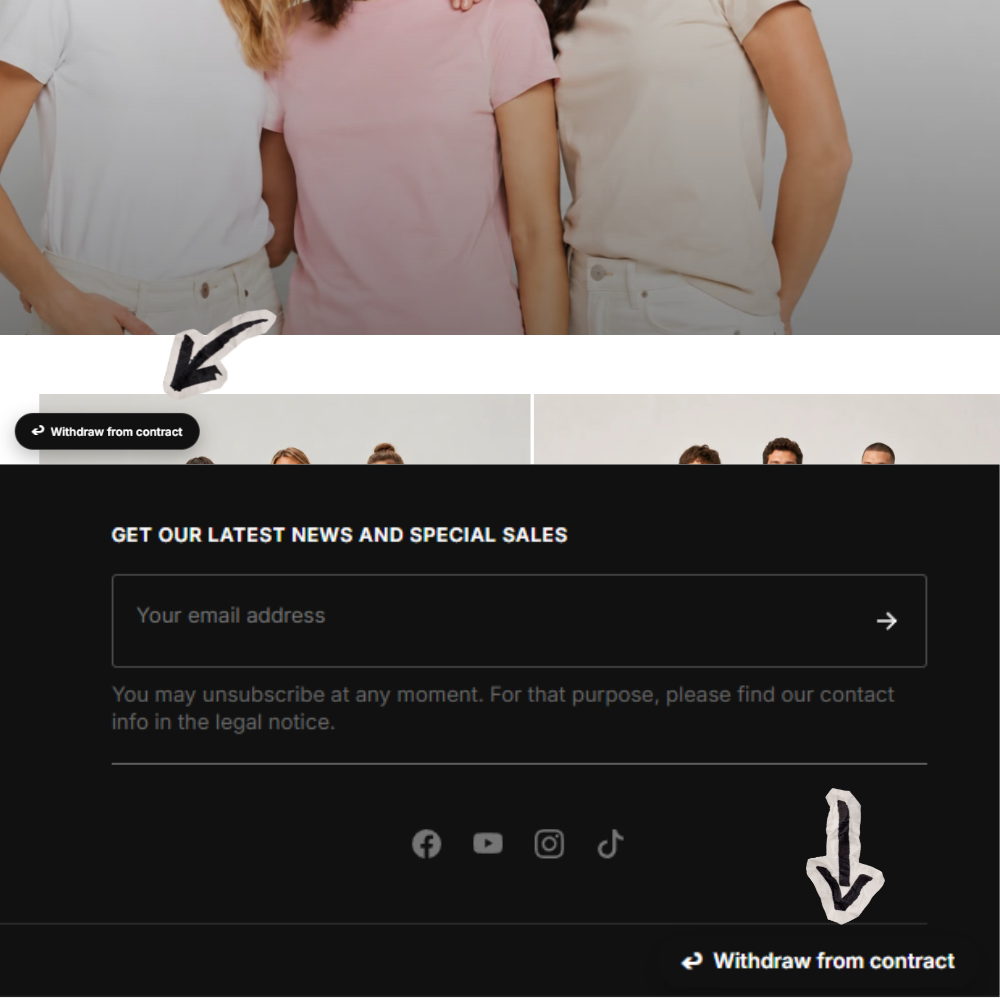
A floating button, or a static footer link — your choice.
Display the withdrawal function as a floating “Withdraw from contract” button, or as a static link in your footer — whichever suits your store. Either way it stays permanently reachable, exactly the easy-to-find access the directive intends.
One price. One shop. Yours to keep.
A single licence, bound to one shop domain. Buy once, install, done — the licence activates automatically on your store.
199,99 RON · $43.99 · £33.99
Price excludes VAT where applicable. Invoiced with your company details.
Card payment secured by Stripe. The licence key is emailed instantly after payment.
- Visible withdrawal button + full request flow
- Back-office request management
- Customer, verification & admin emails
- All storefront languages
- Updates for the current major version
- Email support from the developer
Licence binds to the first domain it’s used on.
Answers, plainly.
What does Directive (EU) 2023/2673 actually require?
It introduces a withdrawal function — in practice a permanently available, easy-to-find, clearly labelled button — that lets a consumer withdraw from a distance contract without hunting through legal text. EU Withdrawal provides exactly that button and the request flow behind it. It does not replace your legal advice on whether and how the rule applies to your business.
Do customers need an account to withdraw?
No. That’s the point. The customer enters their order reference, verifies ownership with a one-time email code, and confirms. No login, no password, no friction — which is what an “easy to use” withdrawal function is meant to be.
How do you stop fraudulent or mistaken requests?
Every request is verified by a one-time code sent to the email address on the order. A request is only recorded after that code is entered, so it’s tied to whoever controls the order’s inbox.
What does the customer receive afterwards?
An on-screen reference number and a confirmation email on a durable medium, restating the request, the order, and the refund terms — including that standard delivery is refunded when the withdrawal is exercised in time.
Where does the button appear?
You choose: either a floating “Withdraw from contract” button that stays visible on your storefront, or a static link in your footer. Either way the withdrawal function is permanently reachable, as the directive expects. The label and styling are configurable and fully translatable for each of your storefront languages.
How does licensing work?
One licence is bound to one shop domain. After payment, your key is emailed instantly; you paste it into the module and it activates by checking your domain against the licence server. Moving shops? Contact us.
Which PrestaShop versions are supported?
The module targets modern PrestaShop 1.7 and 8.x stores. If you’re unsure about your exact setup, email us before buying and we’ll confirm.
Is the customer’s data sent anywhere?
Withdrawal requests are processed inside your own PrestaShop. The only outbound call is a licence validation that sends your key and domain — never customer data — to the licence server.
Give your customers the button. Give yourself the record.
Install once, and every withdrawal becomes a verified, documented request instead of a support email you have to chase.
One-time licence · instant key by email · domain-bound